
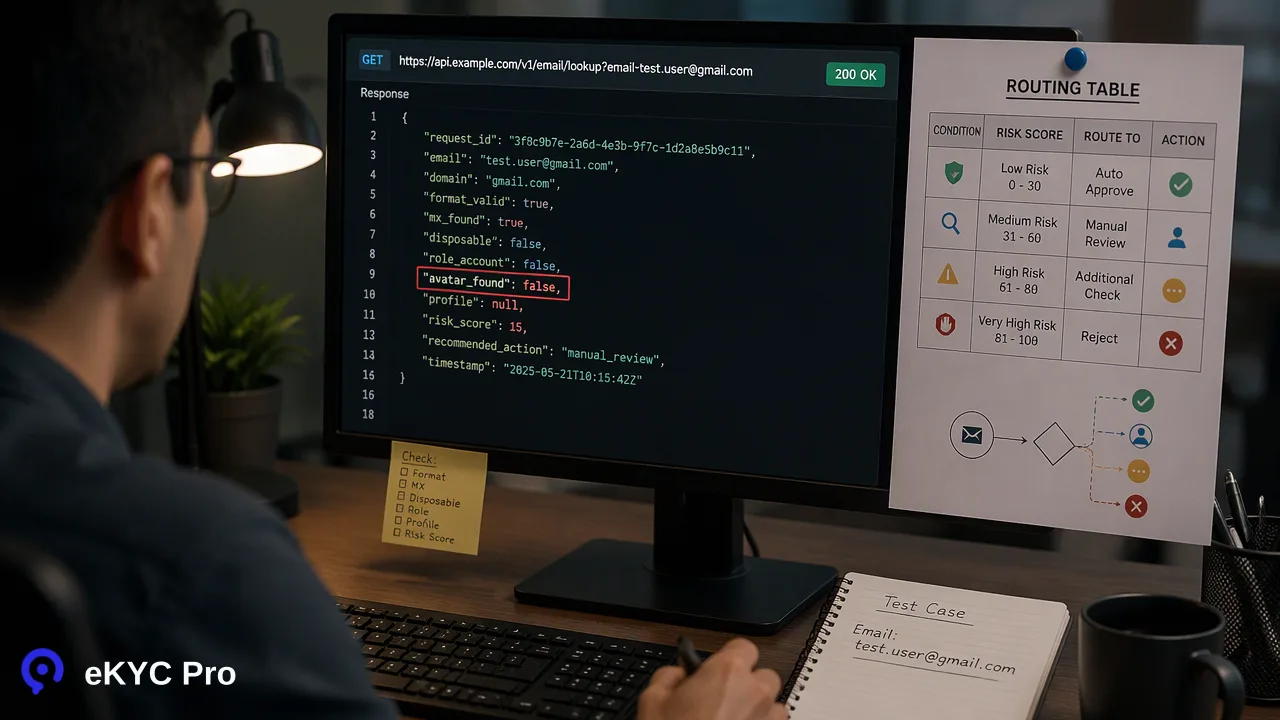
An email risk signal API returns one account-related signal for one email identifier at the moment of signup, so a reviewer or an automated rule can decide whether to approve, step up, or queue the account. With eKYC Pro, each request carries a single supported email identifier and runs the selected service. The result informs a review decision; it is one input among several rather than a verdict on who the user is.
Where an email risk signal fits in signup review
Most signup forms collect an email address before anything else, which makes it the earliest identifier a team can examine. A real-time email risk signal answers a narrow question: what does the selected service report about this address right now? That narrow answer is useful precisely because it can be placed inline, between form submission and account creation, in the same request path.
The flow usually looks like this:
- The user submits the signup form with an email address.
- Your backend sends that one address to the selected eKYC Pro email service in a synchronous request.
- The returned signal is passed to your own rules or to a reviewer.
- Your rules route the signup: approve, request an additional step, or hold for manual review.
Because each request handles one identifier, the check scales by calling the API once per signup rather than by assembling lists. This keeps the logic per event and easy to trace in logs.
How to read email presence signals
The most common mistake in email review is treating every provider’s result as the same kind of evidence.
| Provider family | What the signal describes |
|---|---|
| Outlook/Hotmail, Yahoo, iCloud | Mailbox existence |
| Gmail, Yandex, Mail.ru | Public-avatar availability |
For Gmail, Yandex, and Mail.ru, an address with no public avatar tells a reviewer very little. The unified email-avatar check covers Gmail, Yandex, and Mail.ru only, so it should not be applied to other providers.
A reviewer should not read it as proof of ownership, consent, or identity.
Two further services look up email addresses against historical records, one for LinkedIn and one for X. These results come from historical data, so a missing match does not show that the address is unregistered, and a match does not describe current account status. Completed lookups of this kind are billed even when no record is found, which is worth remembering when deciding how often to call them.
A practical review flow for one email
A clear routing table prevents analysts from inventing policy on the spot. The example below is an internal choice a team could make, not a product requirement:
- Public avatar present (Gmail, Yandex, Mail.ru): treat as mildly supportive context only.
- No public avatar (Gmail, Yandex, Mail.ru): do not penalise the signup on this alone; look at the other signals.
- Historical record found (LinkedIn, X): note it as background that may be out of date.
- No historical record: record it and move on; it does not describe the current state.
- Indeterminate or timed-out check: apply the fallback you chose in advance, such as a delayed re-check or a lightweight step-up. A service check that is indeterminate or times out is generally not billed.
Writing these rules down before launch keeps decisions consistent between reviewers and makes it possible to audit them later. When one email signal feels thin, a saved Combo Check can run several email checkers concurrently for the same address, and the selected Per-call result stays separate from the Combo output so analysts can see where each reading came from.
Mistakes to avoid when reading results
- Using a signal as a final decision. Account presence, a public avatar, or a historical association is context for a rule you define; none of these settles questions of identity or fraud.
- Write provider-specific branches.
For governance, many teams record which signal drove each routing choice. That record helps when a legitimate customer disputes a hold, because the reviewer can explain the reasoning without guessing.
FAQ
How many email addresses can one eKYC Pro request check?
One. Each request carries a single supported email identifier, and each signup is checked as its own event.
What does a missing public avatar mean for a Gmail address?
It reports only that no public avatar is available.
How should teams treat LinkedIn or X email lookups with no match?
As a historical-records result.
How can teams prepare for a check that times out?
By agreeing on a fallback beforehand, for example a delayed re-check or a light step-up, so reviewers apply the same rule every time. Timed-out checks are generally not billed.
Get Started with eKYC Pro
Explore eKYC Pro’s single-identifier APIs and choose the service-specific, combined-signal, or unified-score workflow that fits your use case.